

Where each contact came from
What you'll learn
- How Parlario automatically detects contacts who came from an ad
- What happens if the same contact messages you again from a different campaign
If you run "Click to WhatsApp" or "Click to Instagram" ads on Facebook or Instagram, Parlario automatically detects when a contact messages you from one of those ads — on either channel.
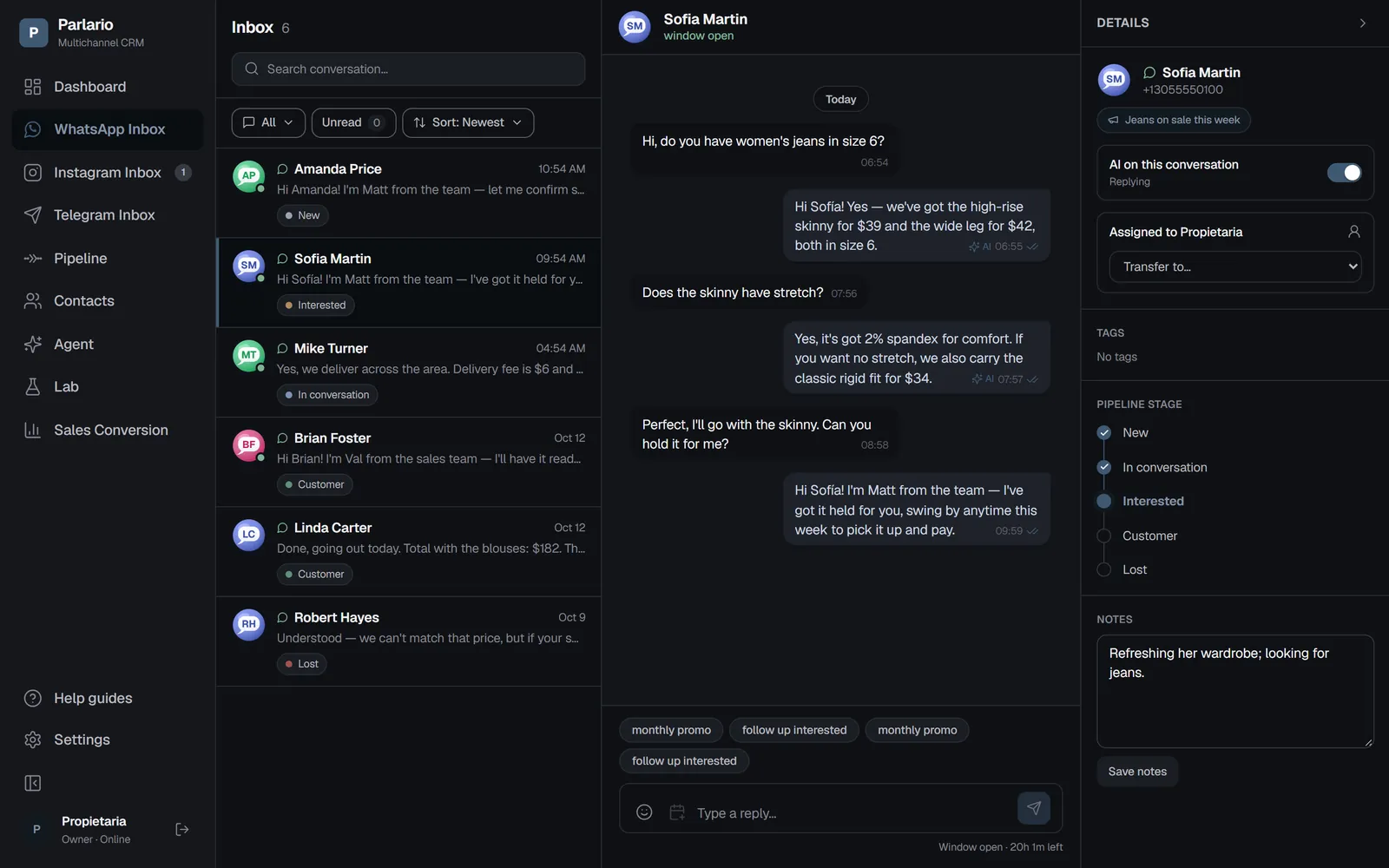
The first message of a conversation that comes from this kind of ad carries the ad's name. Parlario saves it and shows it as a label with a megaphone icon, both in the Contacts list and in the Inbox details panel. If the contact messaged you organically, they simply show no label.
If that same contact messages you again later from a different campaign, the main label doesn't change — but that new touch isn't lost: in the contact's details panel you'll see a collapsible "Campaign history" section with the date and ad for each one. The Contacts CSV export also includes this full history.

Recap
- There's nothing to configure — if you run "Click to WhatsApp" or "Click to Instagram" ads, this feature is already active
- The label is first-touch: once assigned, it doesn't change even if the contact comes back from a different ad
- It only applies to messages arriving through a real Meta ad — it can't be assigned manually
- Later touches aren't lost: they're kept in the contact's campaign history, visible in the Inbox and in the CSV export
To unmark the lesson, select the button again.
Questions? Visit our support portal: support.parlario.co